Lassco Wizer W174 Pad Separating Knife - W174
FAQ: 0 Questions, 0 Answers
0 Q&As
Item# W174
- Separates pads smoothly and easily.
- Carbon steel blade with solid wood handle.
- Smoothly fits between pads to separating them for easy stacking, moving, production, and more.
- Part Number: W174
ProductDescription
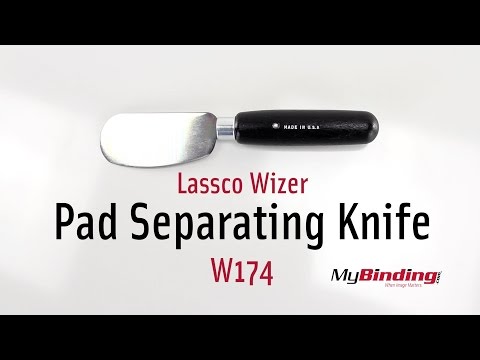
The Lassco Wizer W174 Pad Separating Knife easily and quickly separates pads for convenient use in your padding press. Made with a carbon steel blade and a wood handle, the W174 pad separating knife smoothly fits between pads to separating them for easy stacking, moving, production, and more. Check out the Lassco Wizer W174 Pad Separating Knife on MyBinding.com today and save.
Product Details
- Separates pads smoothly and easily.
- Carbon steel blade with solid wood handle.
- Part Number: W174
Demonstration Video
Lasso Wizer Pad Separating Knife Overview
Transcript :
This is the Lasso Wizer Pad Separating Knife!
After you glue your pads, and they dry for the proper amount of time, and you remove the project from the padding press, now you are ready to separate the large stack of pads for individual use.
So, slip the knife under your chipboard, or wherever you want, and slide it partially across to cut the glue. I found that for best results, finish off the separation by pulling the pad off—this is in fact what the pads are made to do. Do this to all the pads.
On the few times I tried to use the knife across the entire length, I ended up cutting in ...
After you glue your pads, and they dry for the proper amount of time, and you remove the project from the padding press, now you are ready to separate the large stack of pads for individual use.
So, slip the knife under your chipboard, or wherever you want, and slide it partially across to cut the glue. I found that for best results, finish off the separation by pulling the pad off—this is in fact what the pads are made to do. Do this to all the pads.
On the few times I tried to use the knife across the entire length, I ended up cutting in ...
This is the Lasso Wizer Pad Separating Knife!
After you glue your pads, and they dry for the proper amount of time, and you remove the project from the padding press, now you are ready to separate the large stack of pads for individual use.
So, slip the knife under your chipboard, or wherever you want, and slide it partially across to cut the glue. I found that for best results, finish off the separation by pulling the pad off—this is in fact what the pads are made to do. Do this to all the pads.
On the few times I tried to use the knife across the entire length, I ended up cutting into the pages, ruining the entire pad below the one I was cutting off. So don’t do it—or do if it actually works for you, but be warned!
But now you have your own custom made notepads!
