Robust all-metal construction ensures durability and long-lasting performance for heavy use.
Customizable punching with independently disengageable dies for precise document sizes.
Versatile binding options with 3:1 pitch for a professional finish on various document types.
Compact design with a weight of 45 lbs, making it easy to move and store in any office space.
Product Description
The Akiles WireMac Manual Twin Loop Wire Binding Machine renders efficiency and productivity. Its full range of functions and state of the art mechanisms were especially designed with one goal in mind: to fully meet the needs of the wire binding industry! Its great features and excellent design make the Akiles WireMac Manual Binding Machine the most popular wire binding machine on the market. The Akiles WireMac available in both a 3:1 pitch and a 2:1 pitch configurations includes all metal construction, fully disengageable dies, a convenient wire hanger and a sturdy wire closer. The Akiles WireMac Binding Machine is truly built to last.
Product Details
Heavy-Duty Design
20 sheets single punching capacity (20 lbs paper).
Available in 3:1 or 2:1 Pitch Configurations
14" width punching capacity with open sides for even wider documents.
All dies can be independently disengaged, to allow the punching of any size document while preventing partial side-end perforation.
Closing capacity: WireMac-31: From 3/16" to 9/16" / WireMac-21: From 5/8" to 1 1/4"
All metal construction.
Specifications
Model: WireMac-31 / WireMac-21
Pitch: 3:1 / 2:1
Punching Length: 14" (40 dies) / 14" (27 dies)
Disengaging Dies: All 40 / All 27
Hole Punch: Square (0.157" x 0.157") / Rectangular (0.157" x 0.217")
Binding Thickness: From 3/16" to 9/16" / From 5/8" to 1-1/4"
Single Punching Capacity: Up to 20 sheets (20 lbs)
Closer Selector: Included
Closing Mechanism: Vertical
Master Selector: Included
Metal Wire Snatch: Included
Wire Diameter Scale: Included
Side Margins Control: Included
Punching Margin Control: Included
Weight / Volume: 45 lbs / 2.55 CbFt
Actual Machine Dimensions (L x W x H): 22-1/2" x 13-1/2" x 18-1/2"
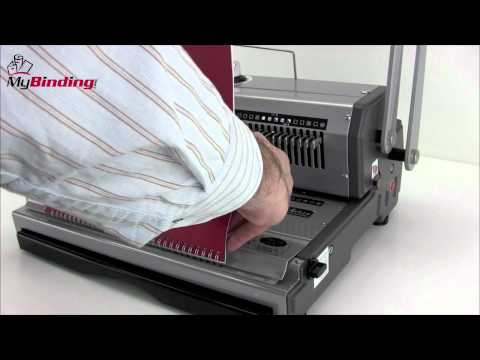
Welcome to MyBinding video. Let's have a look at the WireMac 31, a manual 3:1 pitch double loop wire binding system by Akiles. A punch and a bind, it's all here for great binding. First, set the side margin control knob so that all punches are consistent throughout your project. Pull out or disengage any of the die pins so you get no half holes. According to the size or thickness of your book, you may want to adjust the depth of margin control. The larger the book may require the larger the margin. If all settings are correct, let's begin with the project. Starting with the covers, punch all the way through your entire project, making consistent punches using all of your settings. The C31 can handle up to 20 sheets of 20lb paper per punch. With the punching through, gather your project together; it's time to bind. Once you've selected your spine, press here on this plate. It opens up and holds the wire in place. Before you thread your project onto the spine, if you take the back cover and flip it around to face the front, then in the end the seam will be hidden. Drape it over all the teeth, make sure they all go through. Remove your project. And now for the closing. Make the adjustment on the top knob. Match it up with the size spine you're using. With the ?C" shape opening of the spine, place it all the way into the closer and pull the lever down until it stops. Then, in the back, you've got the seam hidden between the back cover and the back page and a great looking book. All the punched chips fall into the chip tray below, easy disposal. And that's it, that's the WireMac C31. For more demos, reviews, and how tos on this product and many more, check out MyBinding.com.
Love the machine I purchased! The only tiny complaint is that I didn't receive a shipping notice with tracking. I had to contact the company, but they sent it by email in just a few minutes. I would buy from this company again.
G
Grant Paxton
Works great! Thanks!
G
Great machine/ Great Company
Great machine/ Great Company
I’m so glad I found this machine!! It punches through my chipboard covers to make my journals. It seems very durable and well made. I Know it seems like a lot of money but, it’s well worth it. I’ve tried the other machines that are cheaper on Amazon and they just don’t do the job like this one does. You won’t be disappointed.
L
Lisa
Heavy Duty Machine
I have not had much time to play around with it yet, but it is built like a tank and seems to be a very solid machine that is pretty easy to use. I have no experience with coil binding, yet my first attempt went really well. I didn't realize I needed to order the coil crimper separately, so with my trial run I used a pair of needle nose pliers and managed okay - promptly ordered the crimpers though and a couple larger sized coils. I believe this will provide much more functional binding for us in comparison to the comb binding that we were using.
Akiles WireMac M Manual Double Loop Wire Binding Machine Review
Overview:
The Akiles Wiremac M is one of the most popular double loop wire binding machines available on the market.
This machine is available with either a 2:1 pitch punching pattern or a 3:1 pitch punching pattern. You will need to choose the model that best fits your binding needs.
Both models include a number of great features including a heavy duty wire closer, sturdy metal construction, a wire holder to help you hang your documents, and fully disengageable dies.
These features make the Wiremac M perfect for the small to medium sized company that wants to bind their own documents using
Strengths / Features:
The Akiles Wiremac M is available with your choice of either a 2:1 pitch (2 holes per inch) or 3:1 pitch (3 holes per inch) punching pattern. The 3:1 pitch hole pattern is designed for use with twin loop wire spines from 3/16″ up to 9/16″ and can also be used with GBC Proclick and 3:1 pitch spiral coil spines. The 2:1 pitch punch can be used with wires from 5/8″ up to 1-1/4″ and can also be used with special 2:1 pitch small sized wire. Depending on the size of your documents that you want to bind, you will need to select the hole pattern that best fits your need when you purchase the Wiremac M.
The WireMac M includes a legal sized punching throat and fully disengageable dies. This means that this machine can be used to punch letter size, legal size, half letter, A4 and any custom sized documents less than fourteen inches in length. It also has an open throat for punching longer documents using a two step punch process.
Both versions of the Wiremac M have a heavy duty wire closer that is designed to take the “C” shaped wire spines and close them so that they are round. The wire closer on the Akiles Wiremac is controlled by a convenient knob located on the top of the machine and is made from heavy duty steel components. This helps to ensure that the wire closer will close documents consistently even after years of use.
The WireMac has a clamp style wire holder on the front of the machine. This is designed to hold the binding spine in place while you hang the pages on it.
The Akiles Wiremac has a manual punching mechanism that is capable of punching up to 20 sheets of 20lb paper per lift. This is a fairly good punching capacity for a machine of this type and price range.
Weaknesses / Limitations:
Although the WireMac has a decent punching capacity, it is still a manual punch. Users who need to bind large volumes of documents or need to bind large documents quickly should really consider an electric punch to improve productivity and efficiency.
Although the wire holder on the front of this machine is better than having no holding device, wire binding machines with hooks to hang the wires on tend to be easier to use. The hooks help to prevent the wire from becoming deformed during the inserting process. Learning how to use the clamp style Wiremac can be a little bit tricky.
As was mentioned above, you need to choose either a 2:1 or a 3:1 pitch hole pattern when you buy this machine. The choice that you make will limit the supplies that you are able to use. Many organizations can settle on one machine or the other. However, users who need the flexibility to bind multiple sized presentations and reports may want to look at a machine that can produce both hole patterns such as the Wiremac Duo Combo.
Recommendation:
The Akiles Wiremac manual combo is an ideal choice for small and medium sized organizations that need to bind a few documents on a daily basis.
It offers a high quality manual punch, heavy duty metal construction, a durable wire closer and fully disengageable dies. All of these are features that are essential in a high quality wire binding system.
However, users who need to bind large numbers of documents or who need to bind a wide variety of document thicknesses may want to consider either an electric binding machine or a machine that can punch both 2:1 and 3:1 pitch hole patterns.
This review was written by Jeff McRitchie who is the director of marketing for Mybinding.com Jeff has written more than three hundred articles and more than two hundred reviews on Binding Machines, Binding Supplies, Report Covers, 3-Ring Binders, Index Tabs, Laminators, Laminating Supplies, Paper Shredders and Paper Handling Equipment.