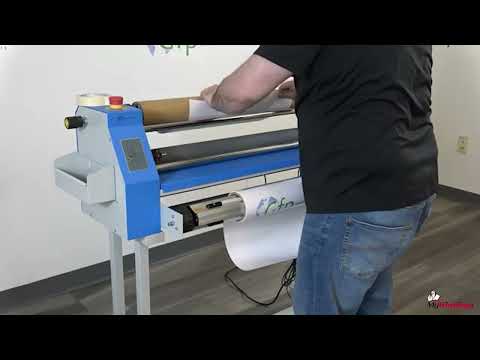
GFP 220C 20" Compact Cold Laminator with Foot Switch
FAQ: 0 Questions, 0 Answers
0 Q&As
Item# 04GFP220C
- 20" cold roll laminator
- Compatible with film up to 10mil thick (3" core) & boards up to 1/2" thick
- No warm-up time required
- Up to 138" per minute adjustable speed
Product Name
Item Number
Price
Qty
ProductDescription
Introducing the GFC 220C – your ultimate companion for the latest wide format inkjet printers. Designed with infinite hand wheel adjustment and boasting 2.5" diameter rollers, this compact powerhouse redefines convenience and precision. Crafted to maximize space without compromising efficiency, the GFC 220C promises consistently professional results at an unbeatable entry-level price point. Ideal for photo studios, copy shops, and graphic designers, its intuitive controls and included foot pedal ensure seamless operation. With a mere 5 square feet footprint, elevate your printing experience today with the GFC 220C.
Product Details
- Entry Level Priced - Designed for small operations.
- User Friendly - Intuitive controls.
- Versatile - Mount, laminate pre-mask tape.
- Professional Design - Rugged, reliable, feature-rich.
- Compact Size - Uses less than 5 square feet.
- Easy Set-Up & Low Maintenance .
- Fits easily in your office.
- Quick and easy set-up.
- Infinite Hand Wheel Adjustment .
- 2.5" Diameter Rollers.
- Foot pedal included.
- Applications:
- Banners
- Posters
- POP Displays
- Photographs
- Architectural Designs
- Maps
- Presenations
- Vinyl Lettering Pre-mask
Item Specifications
- Laminating Width: 20"
- Roller Diameter: 2.5"
- Maximum Speed (feet/minute): 11.5 ft/min
- Main Rollers: Rubber
- Roller Gap: 1/2"
- Pressure/Gap Mechanism: Hand Wheel
- Unwinds: Auto Grip Shaft
- Liner Rewind: Direct Drive
- Supply Shaft: Auto Grip Shaft
- Tension Adjustment: Single Knob
- Max. Roll Diameter: 6" OD
- Power Supply: 110v 0.4A
- Power Consumption: 38W
- Foot Pedal: Included
- Compatible Supplies: 3" Core Pressure Sensitive Roll Film - 1.5-10mil Thick & Up to 20" Wide
Mounting Board - Up to 1/2" Thick - Compatible Accessories: Optional Stand For GFP 220C Compact Cold Laminator
- Dimensions (W x D x H): 16" x 22" x 38"
- Net Weight with stand: 125 lbs.
- Dimensions with stand (W x D x H): 46" x 22" x 42"
- Shipping Dimensions Machine ( W x D x H): 43" x 23" x 22" 109 lbs.
- Shipping Dimensions Stand ( W x D x H): 30" x 19" x 7" 35 lbs.
- Warranty: 1 Year Manufacturer's Warranty Parts & Labor (Installation is available)
Demonstration Video
Gfp Applications - PSA Overlaminate on Printed Vinyl using the Gfp 220C or 230C Laminators
Transcript :
"So now we're going to do a single side lamination with a cold laminate here onto a roll of printed media that we print on vinyl here. We're going to start by loading up our film onto our back supply shaft or rear supply shaft by opening our cradles, removing the shaft, coming over to our film, simply putting the shaft into the roll laminating film, twisting, and putting the shaft back into the cradles. Now, we're just going to close up our cradles, and we can align this with our ruler that's on our shaft. We got an 18-inch roll here, so we're going to just put it between the nines and leave t ...
"So now we're going to do a single side lamination with a cold laminate here onto a roll of printed media that we print on vinyl here. We're going to start by loading up our film onto our back supply shaft or rear supply shaft by opening our cradles, removing the shaft, coming over to our film, simply putting the shaft into the roll laminating film, twisting, and putting the shaft back into the cradles. Now, we're just going to close up our cradles, and we can align this with our ruler that's on our shaft. We got an 18-inch roll here, so we're going to just put it between the nines and leave that be.
Now, we're going to come to our media. So, we're going to remove our lower supply shaft and do practically the same thing. We're going to remove the shaft, put our roll of vinyl, come through, and then into the cradles, close our cradles, and center our roll. Another way to web it up, another method I'm going to start the same way. We got to get our film to the release liner take-up to get our release liner off. I'm going to pull the tape, pull back and spin back up, and then we're going to take our film again and go under our take-up KN around the front hand Wheel bar and spin our take-up and get our film across here.
We're going to take our knife, our blade, being safe and be around the rollers and just score our film. We're going to separate our film. What we're going to do is we're going to bring it down to the front of the roller, the top roller, kind of just tuck it for a second, then going to lift our table and then just bring it down past the bottom roller about a couple of inches past the bottom roller and just let it hang close my table. Then I'm going to grab my leader board and I'm just going to push that into the rollers and just run that a few inches till I have a little bit here left. And what I'm going to do is I'm going to take some tape, some heavier tape, and just take a piece of that and stick that for a second here.
I'm going to bring my roll of prints and just pull up and I'm going to stick it to the lead edge of the board and tape it down good and just make sure. Now that I got it in place, I'll take a second piece of tape just to be safe and then run it. What will happen is once we're through the board, the roller will stop, the machine will stop, and we just come down and just close our roller until we hit that stop point and then a little bit more, a 12th of a turn, watch our liner here. We're going to slow down our take-up and just let it run, and we're good to go."
Gfp 220C_230C Applications - Pre-Coating Mounting Boards
Transcript :
We're going to pre-coat a board on our 230C laminator, which you can also do this process on the new 220C laminator. The process is the same on there. We're going to start by taking our roll of adhesive here and getting it onto the machine. So, I'm going to remove my top supply shaft and slide that shaft to the adhesive roll and center that up and back on my machine, and close my cradles by the groove on the cradle. Then, I can look at my ruler; it's a 25-inch roll we got, so I'll put it at 12 and 1/2 and 12 and 1/2 to center it. Now, since we're doing a roll of adhesive and we're not using a ...
We're going to pre-coat a board on our 230C laminator, which you can also do this process on the new 220C laminator. The process is the same on there. We're going to start by taking our roll of adhesive here and getting it onto the machine. So, I'm going to remove my top supply shaft and slide that shaft to the adhesive roll and center that up and back on my machine, and close my cradles by the groove on the cradle. Then, I can look at my ruler; it's a 25-inch roll we got, so I'll put it at 12 and 1/2 and 12 and 1/2 to center it. Now, since we're doing a roll of adhesive and we're not using a film with a release liner we're taking off, we can remove just to make it easier. We can remove our release liner take-up if we want and set that aside for now. The next thing I want to do, okay, we're back at our front of the machine. We got a roll of adhesive on the top supply shaft. So now, I got to set my roller pressure for my board. So, I'm going to take a piece that I'm using as a leader board that's the same thickness as our main board that we're going to pre-coat. So, I just want to make sure I never want to use something a different thickness because I want to get the roller set right. So, I'm going to slide it in between my rollers, and what I'm going to do is I'm going to give it a little wiggle, and as I'm doing that, I'm going to bring my roller pressure dial down, my pressure dial, until my board gets caught and I can't move it anymore here. And then, once I get that, we know we have the right pressure. It's foam board and stuff like foam board chloroplast. I don't want to overpressure because I don't want to crush it. If it's a more rigid substrate maybe I can add a little extra hour on the clock as he said on the dial as it's not going to affect the actual thickness of the substrate. I'll put it in reverse to back it out to get it out of here because I can't remove I change my dial here to get it out. I can't open it up and pull it out because I'm going to lose all the work I just did. So, I'll just back it out. You can run it forward and go out the back if you want if that's easier. Once I get it out of here, I'm going to bring flip it back to forward, making sure I do that because if I don't, we're going to have to run it forward to get through reverse won't work for us when we pre-coat. So, I'm going to bring my adhesive down next, and I'm just going to bring it down in the front of the roller and kind of try to tuck it behind this bar or hand wheel bar. And then, I'm going to unlock my safety unlock and lift my table. And then, once I do that, I'm going to bring my adhesive back down, and I'm going to take my leader board and just kind of press it in between the rollers like that and then step on my pedal and run that through. And I'm going to run that through far enough up to the roller so I can bring my table back down like that. So now, what I want to see now is my adhesive to be tight to that roll as we see there. If it's not tight, take another scrap little small board maybe and run it through it in there and just try to get that out because we don't want any tunneling once we run our good board. But I'm ready to run our good board, so I'm going to pretty bud it up against my leader board, and I'm going to hit the run, and I'm just going to follow that in. I might adjust my speed; I'm on run. You can use the foot pedal if you want to control; either way, it's going to work fine on here. And then, my finished board, if we had multiple ones, we would just bud it up against the next one and just follow it in, or I have the ability to take a saw, so if I'm just doing say one board on my last board, I can file this one in with another leader type board just so I can cut it out of the back like this and just enough so I can get this out and then I'll stop it.
Gfp 220C_230C Applications - Mounting To A Substrate
Transcript :
"Now we're going to take this image that we printed out on paper, and we're actually going to mount it to this 3/16 foam board, which has already been pre-coated with a mounting adhesive on one side. And we're going to start by we have to get our roller to the right thickness and right gap. So, we're going to take our leader board, which is the same thickness as our board, we're going to run our foam board, and we're going to place it between the rollers. And all we're going to do is we're going to take our pressure dial here, and we're just going to come down onto the board until we get it to ...
"Now we're going to take this image that we printed out on paper, and we're actually going to mount it to this 3/16 foam board, which has already been pre-coated with a mounting adhesive on one side. And we're going to start by we have to get our roller to the right thickness and right gap. So, we're going to take our leader board, which is the same thickness as our board, we're going to run our foam board, and we're going to place it between the rollers. And all we're going to do is we're going to take our pressure dial here, and we're just going to come down onto the board until we get it to grab it like that. Then, all I'm going to do to get this out is going to flip it to reverse, step on my pedal, and run this board, the leader board out of the machine and then back into forward. So now, we've come over to our table where we're going to get our print and our foam board ready to run through the laminator.
So, what I'm going to do is I'm going to take my liner off my adhesive on the board and just peel it back a couple of inches and make like a hinge here so I can actually tack my start of my print down. So, like that, I'm going to take my print, I'm going to do my best to line this print up to the board, get that leading edge right, and then kind of look at where I'm at here and then I'm just going to go and tack it down across the lead edge.
Okay, back at the laminator, I'm going to take my foam board and I'm going to place it on the table and feed it up to the rollers. And what I'm going to do is I'm just going to step on my pedal and just let it grab it, just give it a quick step, push it in, and let it grab that lead edge. Then, I'm going to take my print and I'm going to run it over the roller like this and what I'm going to do is I'm going to kind of grab my print, try to hold it tight to the roller, grab my liner at the same time, and kind of as I'm pulling my liner back and running it through with the foot pedal, I'm going to try to keep my print tight to that bar. I'm going to use the pedal here but you can put it in run on this machine and run it, flip through so I can actually flip it to run as I'm on and come off the pedal always making sure my liner, you're pulling it and making sure the liner does not go back into the roller and underneath and ruin your print so kind of just keep an eye on that kind of keep your pressure on your print as it's coming around and then try to kind of that trail edge try to almost like try to grab it give it some tension give it some back tension so when it flips back down it doesn't worry about getting like a crease in it and then it'll run through and we have our finished product.
"