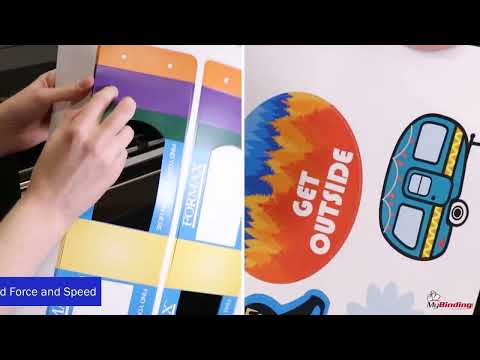
Formax Cut-True DDC50 Automatic High-Speed Digital Die Cutter
- Fully automatic die cutting, creasing, & perforating system
- Precisely creases and cuts sheets up to 13” x 19” & 350 microns thick
- Cut True Pro Software Suite for easy project setup
- Ultra-fast & accurate high-power dual head creasing/cutting plotter
ProductDescription
The Cut-True DDC50 Automatic High-Speed Digital Die Cutter enables fast, on-demand production of custom packaging, displays, kiss-cut labels, and other uniquely shaped applications with precise edge quality and minimal setup. It uses QR Code recognition to automatically process mixed jobs in a single stack, cutting and creasing sheets up to 350 microns thick into virtually any shape. Key features include a dual-action cutting and creasing head, high-capacity vacuum belt feeder, Cut-True Pro Production Studio software, a touchscreen control panel, and a freestanding PC workstation for streamlined operation. Designed for high efficiency and accuracy, the DDC50 delivers premium digital finishing performance in mid-volume production environments.
Available Accessories:
| MyBinding Item # | Formax Item # | Description | Benefit |
|---|---|---|---|
| 05FXDDC5010 | DDC50-10 | Blade Holder | Replacement part for holder included with the machine |
| 05FXDDC5020 | DDC50-20 | Blade Holder Position 2 | Enables two-blade cutting functionality and is required for use of the creasing tool |
| 05FXDDC5030 | DDC50-30 | Creasing Tool | Enables creasing functionality |
| 05FXDDC5040 | DDC50-40 | Pen Tool | Enables drawing functionality |
| 05FXDDC5050 | DDC50-50 | Felt Cutting Strips | Replacement part for strip included with the machine. Helps blades last longer |
| 05FXDDC5060 | DDC50-60 | 30-Degree Blade | Designed for superior cutting of thin stocks |
| 05FXDDC5070 | DDC50-70 | 45-Degree Blade | Designed for superior cutting of medium stocks |
| 05FXDDC5080 | DDC50-80 | 60-Degree Blade | Designed for superior cutting of thick stocks |
Product Details
- All-Digital Production: No dies required which reduces setup costs.
- Dual-Action Cutting/Creasing Head: Handles cut-through, crease, and kiss-cut functions.
- Cut-True Pro Production Studio Software: Streamlined workflow with advanced job controls.
- Mixed Job Processing: Processes varied jobs in a single stack.
- Complete Workstation Package: Includes PC, stand, and 32” curved monitor.
- Adobe Illustrator Integration: Imports files directly for fast setup.
- High-Capacity Vacuum Belt Feeder: Next-generation feeding for consistent performance.
- 7" Touchscreen Control Panel: Easy-to-use interface for quick adjustments.
- Automatic Air Blade & Jog Function: Ensures smooth sheet handling.
- QR Code Job Recall: Instantly loads saved Job Library settings.
- Dual Grip & Drive Feed System: Improves feeding accuracy and stability.
- Integrated Media Catch Tray: Space-saving and efficient output collection.
- All-Metal Stand on Casters: Durable and mobile for flexible workspace layout.
- Retention Tags: Keep cut items held securely in the sheet.
- Extendable Paper Infeed Tray: Supports larger or variable sheet sizes.
- High-Speed CCD Camera Registration: Delivers precise alignment and accuracy.
- Revolutionary Cutting Strip: Supports cut-through, creasing, and kiss cutting in one system.
Item Specifications
- Capabilities: Die-Cut (with retention tags), Kiss-Cut, Crease, Perforate
- Standard Media Size: 8.5” x 11”, 11” x 17”, 12” x 18”, 13” x 19”
- Media Size:
- Minimum: 7” x 13.4”
- Maximum: 13.4” x 28”
- Maximum Cutting Area: 13” x 27.5”
- Media Thickness: .0055” - .013” (140-350 microns)
- Cut/Crease Force: 750gf Max 350 micron
- Maximum Speed: Up to 47”/second (1,060mm/second)
- Infeed Tray Capacity:
- Up to 3.3” high
- Up to 1,000 sheets 20# Bond Letter
- Feeding System: Vacuum belt feeder
- Weight:
- Cutter w/stand: 300 lbs (136kg)
- Workstation w/stand: 71 lbs (32kg)
- Dimensions:
- Cutter: 33” W x 34” D x 49” H (828 x 851 x 1230mm)
- Workstation: 29” W x 21” D x 56” H (737 x 533 x 1422mm)
- Power Supply: 100-240V 50/60Hz
Demonstration Video
Formax Cut-True DDC50 Digital Die Cutter Video
This fully automatic cut-sheet die cutting, creasing, and perforating system with workstation precisely creases and cuts sheets up to 350 microns thick into virtually any shape you can imagine. The key is the ultra-fast and accurate high-powered dual head creasing and cutting plotter. Combined with the Cut-True Pro software suite, the process to bring your designs to life is possible in any business environ ...
The Formax Cut-True DDC50 Digital Die Cutter is the solution to create custom packaging, advertising displays, kiss-cut labels and more on demand with superior ease of setup and accuracy.
This fully automatic cut-sheet die cutting, creasing, and perforating system with workstation precisely creases and cuts sheets up to 350 microns thick into virtually any shape you can imagine. The key is the ultra-fast and accurate high-powered dual head creasing and cutting plotter. Combined with the Cut-True Pro software suite, the process to bring your designs to life is possible in any business environment.
The Cut-TrueDDC50 and included workstation fit in any office or production setting with its sleek and modern design and small, mobile footprint, while the cut-sheet design eliminates the need for roll-to-roll systems for short run labels, reducing waste and time.
Standard with the system is the Cut-True Pro Software Suite with a template maker and job library to assist with design and job recall. The software produces QR codes specific to each design for accurate and consistent production. The QR code also allows for mixed stacks of printed sheets to be loaded at the same time, reading the code and changing the settings based on each scan. This function is perfect for short-run environments!
Cutting and creasing can be done on the back or the front of the sheet to allow for more media options. In addition, the force and speed are digitally adjusted for optimal cutting and creasing based on the media type.
The two headed plotter allows for creasing and cutting or perforating in one operation with Interchangeable tools and blades for different media types and job requirements.
An integrated base features a storage space and a unique fold away catch tray for easy access, and casters for mobility.
The Cut-True DDC50 sets the standard for on-demand finishing with unmatched speed and accuracy in the mid production market. The cut sheet design and automated features reduce waste and setup time while creating professional on-demand custom packaging and kiss-cut labels that are only limited by your imagination.
Cut-True DDC50 Workflow Demo Video
The Cut-True DDC50, the ultimate creative tool for labels, light packaging, and branded advertising. Limited only by your imagination
Cut-True DDC5050 File Creation and Cutting workflow
Easy as one, two, three
In this video we will cover designing packaging with the Cut-True DDC50 box template maker, creating cut and crease lines for labels and other custom designs, and the printing and cutting process of your finished piece.
Making Packaging Creation Easy with the included Cut-True DDC50 box Template Maker (Title)
Step 1 Template Selection
...
Cut-True DDC50 Workflow Video Transcript
The Cut-True DDC50, the ultimate creative tool for labels, light packaging, and branded advertising. Limited only by your imagination
Cut-True DDC5050 File Creation and Cutting workflow
Easy as one, two, three
In this video we will cover designing packaging with the Cut-True DDC50 box template maker, creating cut and crease lines for labels and other custom designs, and the printing and cutting process of your finished piece.
Making Packaging Creation Easy with the included Cut-True DDC50 box Template Maker (Title)
Step 1 Template Selection
Open the Template maker program through the icon located on the desktop toolbar.
Select one of the Twenty-Five templates that best fits your design. Adjust the measurements of the box template to fit your item, Then export the file to Illustrator. (highlight icon with a red box)Step 2 Artwork Creation
With the template open in illustrator start by adjusting the size of the document for the paper size being used by editing the artboard properties. For this design we will be using a thirteen inch by nineteen-inch document.
Now select layer one and rename it “cut crease lines” Next add a second layer for the Artwork. Move the Cut line layer above the Artwork layer. Then highlight the artwork layer. With the document size set and the artwork layer selected create your design to fit the template.Step 3 Apply the QR Code
With the artwork complete open the file drop down and select “Cut True Add page marks and QR code” to apply the marks to the file.
The QR code, file number, and registration mark layer will automatically be created and added to the fileTo finish, save the completed file.
Designing, Creating, and Cutting Labels, in any shape you can imagine in a few easy steps! (Title)
Step 1 Add a cut layer
Open your artwork file in Illustrator with layer one set as “Artwork” Next add a second layer and name it cut-linesStep 2 Create the cut lines
Select the cut layer and use the drawing tools to add the cutlines. This is when you can add any additional crease or perforation lines as well.
Next set the document based on the size of the artwork and the number of pieces to be made. To add additional images set the orientation of the image then copy the artwork and cutlines. Paste the required number of images and adjust them to fir the page. To finish separate the cutlines from the artwork Click the eye icons to confirm the cutline and artwork have been separated properlyStep 3 Apply the QR Code
With the artwork and cut lines complete open the file drop down and select “Cut True Add page marks and QR code” to apply the marks to the file.
Finally save the completed file.Printing Artwork, Transferring Files, and cutting creasing on the Cut-True DDC50
Step 1 Printing ArtworkTo print the file first hide the cut lines layer
Select print from the file drop down From the print set up screen set the paper size and select “Do Not Scale” under the scaling tab. Then print your documentsStep 2 Transferring files
Now we have to get the .ill files that hold the cutting and creasing details for each project from the production PC to the Cut-True Pro PC.
To do this a network folder, USB thumb drive, or shareable file can be used to transfer the files. Open the Formax Shortcut folder on your desktop to access the .ill files for the projects. Copy and paste the files to the selected transfer method. In this case a networked folder will be used. From the Cut-true Pro PC Station desktop open the network folder and copy the ill files needed. Then open the Formax Cut-True Data shortcut folder and load the ill files.Step 3 Cutting and Creasing
With the files set, open the Cut-true Pro Program
Select the productivity tab and enter the paper size Load the printed sheets into the feeder Then Press the “Scan QR Coded button” to start processing The DDC50 will scan the document QR code and registration marks, then begin cutting and creasing.