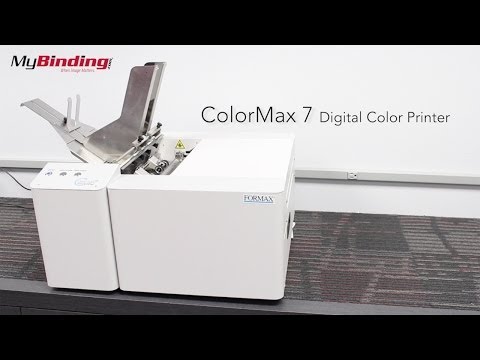
Prints up to 7,500 #10 envelopes or 3,600 letter pages per hour
1600 x 1600 dpi Memjet CMYK inkjet, full bleed up to 8.5" wide
Takes media from 3" x 4.25" to 9.5" x 17" and up to 0.02" (0.5mm) thick
Heat-free printing is safe on windowed envelopes, with an optional 3' conveyor
Product Description
Meet your print shop’s new secret weapon. The Formax ColorMax7 is a lightning-fast, full-color digital printer that brings your mailings, envelopes, flyers, and brochures to life without breaking your budget. Powered by Memjet® technology, print up to 3,600 full pages or 7,500 envelopes per hour, all in stunning 1600 dpi resolution. With a fixed print head, the ColorMax7 keeps things cool—literally. No heat means you can safely print on pre-printed and windowed envelopes without warping or smudging. And, with full-bleed printing on media up to 8.5” wide, you get vivid edge-to-edge designs in one clean pass. Want even more efficiency? Add accessories like the conveyor stacker or RIP software to turn this powerhouse into a full-blown production line. Popular Applications: Branded envelopes with color logos University or corporate mailers Personalized invites and labels Full-color marketing materials On-demand custom letterhead Best Printer For: University and school print centers Corporate mailrooms and in-house marketing teams High-speed envelope printing operations Government and municipal print workflows Businesses replacing toner-based color printers
Product Details
Prints up to 7,500 envelopes/hour or 3,600 full pages/hour
True 1600 x 1600 dpi CMYK resolution
High-capacity 250ml ink tanks
Works with a wide range of paper sizes and thicknesses
Stationary print head means less maintenance, less noise
Specifications
Item Number: COLORMAX7
Manufacturer Item Number: ColorMax7
Speed: Up to 7,500 #10 envelopes/hr | 3,600 full pages/hr
Print Resolution: Up to 1600 x 1600 dpi @ 6 ips
Media Size: Min 3” x 4.25” | Max 9.5” x 17”
Full Bleed Print Area: Up to 8.5” wide
Material Thickness: Up to 0.5mm / 430gsm
Duty Cycle: 30 million pieces or 500,000/month
PC Interface: USB & Ethernet | Windows XP and newer
Welcome to MyBinding video. This is the ColorMax 7 Digital Color Printer by FORMAX. This is a simple to use yet high volume printer guaranteed to make any large printing job quick and easy. We are now going to demonstrate how to use the printer with a few of the extra attachments. First, lock the sheet separators in an upward position. Setting these allow for only one sheet to go through the machine at a time. Next, put a single sheet or envelope below the separators and drop them on to it, walking them into their new position. Itš™s important to set these every time when you use a different type of paper. Be sure to remove the page once youš™re done setting them. The first outer guide has 2 positions, bring it in for 8 ½ x 11š paper, allowing for full bleed capabilities. Then place your page against the guide. Next, set the back holder so itš™s centered with the page you just placed. The twist knobs make it easy to readjust. Once done, bring the other guide in flushed with your page. Adjust the back stop close to the edge of your documents. This will help separate each page in the stack, which you can now add between the guides. This hopper can hold up to 500 envelopes at a time. If you have a conveyor stacker, now is the time to turn it on and set the appropriate speed. Itš™s better that the belt is fast enough so the printed documents donš™t overlap. Printing from your computer is as simple as any other personal printers, but the selling point is the speed at which it does it, printing up to 3,600 full size pages per hour and depending on how you set up your envelopes, you can double that speed. With 70,000 spray nozzle, your prints will print fast and the 200 millimeter ink tank ensure it will have the endurance to keep up with any large projects and thatš™s not to mention the full bleed capabilities. And that is the FORMAX ColorMax 7 Digital Color Printer. For more demos, reviews and how-toš™s, go to MyBinding.com.