Manual punch with 20 sheet punching & 2" binding capacity
Integrated manual comb opener & handle operation
Ideal for medium to large offices
12" punching length with open throat & fully disengageable pins
Product Description
The EcoBind-C is a new high quality plastic comb binding machine from Akiles that offers a sleek and professional design and an excellent punching capacity. Designed for small to medium sized offices, this system can punch up to twenty sheets of 20lb paper per lift. It features a twelve inch punching throat with fully disengageable dies. That means you can use the EcoBind-C to bind virtually any length of document. Plus, the EcoBind-C also a depth of punch margin control and a high quality comb opener that is designed for use with the entire spectrum of comb binding supplies. Check out the EcoBind-C today.
Product Details
Punching Capacity: Up to twenty sheets of 20lb bond paper per lift
Punch Length: Twelve inch punching throat with an open throat for longer documents.
Binding Capacity: The EcoBind-C can be used with combs that are up to 2 inches in diameter.
Ergonomic Punching Handle: The unique design of the punching handle allows an operator to use either hand for punching. That makes this machine an excellent choice for an office environment where both left handed and right hand users will be using the binding machine.
Fully Disengageable Pins: Allows for punching all paper sizes without any partially punched holes.
Depth Margin Control: Adjustable depth margin offers the best margin distance for each book size. Move the holes closer to the edge of the book for smaller documents and further from the edge of the book for larger documents.
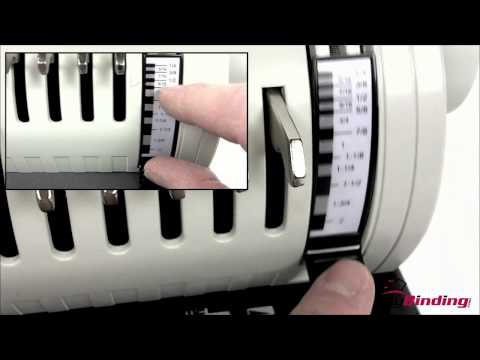
Built-in Comb Selection Guide: Measures document thickness to select the best comb size option.
Stylish & Compact Design: Easily fits on any office environment.
Akiles EcoBind-C Plastic Comb Binding Machine Demo Video
Transcript :
Welcome to MyBinding video. This video looks at the Akiles EcoBind-C Plastic comb binding machine. Let's watch it in action.
With our project ready to go, we'll start with the covers. When we line them up, we'll place them face down, being sure we have the correct side into the slot where we want to punch the holes. Using the margin control knob on the left hand side, we'll be sure to have consistency in punching all of our papers. This is a good time to adjust the depth margin control knob. Depending upon your book size, you may want to have your punches closer or further away from the edge of the paper. And the fully disengageable pins allow for punching of papers of all sizes without partially punched holes. The covers are in, make our punch. The handle it strong, sturdy, ergonomic, and made for one or two hands. Continue working through the rest of your project, punching holes in every page. Depending on the strength of the operator, you'll be able to punch up to 20 pages per lift.
Now that our book is punched and ready, we assemble the pages in order. The EcoBind-C has a built-in comb selection guide. It measures document thickness to select the best comb size that you need. The combs go on the top of the machine. Remember to keep the combs faced up and the project faced down; that way the booklet does not come apart. Use the small arm on the right hand side of the machine to open the teeth of the comb and set it just where you need it. Then we take our project and lay it over the teeth of the comb, being sure that all the teeth are filled. Use the lever arm to close the teeth of the comb, and our project is finished. And that's the simplicity and quality of the EcoBind-C. For more demos and reviews of this product and many more, check out MyBinding.com.
Love the machine I purchased! The only tiny complaint is that I didn't receive a shipping notice with tracking. I had to contact the company, but they sent it by email in just a few minutes. I would buy from this company again.
G
Grant Paxton
Works great! Thanks!
G
Great machine/ Great Company
Great machine/ Great Company
I’m so glad I found this machine!! It punches through my chipboard covers to make my journals. It seems very durable and well made. I Know it seems like a lot of money but, it’s well worth it. I’ve tried the other machines that are cheaper on Amazon and they just don’t do the job like this one does. You won’t be disappointed.
L
Lisa
Heavy Duty Machine
I have not had much time to play around with it yet, but it is built like a tank and seems to be a very solid machine that is pretty easy to use. I have no experience with coil binding, yet my first attempt went really well. I didn't realize I needed to order the coil crimper separately, so with my trial run I used a pair of needle nose pliers and managed okay - promptly ordered the crimpers though and a couple larger sized coils. I believe this will provide much more functional binding for us in comparison to the comb binding that we were using.
Designed for low volume jobs in small to medium organizations, the EcoBind C is an entry-level comb binding machine that includes a lot of features for a relatively low price. We recently gave this machine a good close look and compiled a list of what we considered to be its strengths and weaknesses.
Strengths:
By any estimation, one would have to say that the main strength of the EcoBind C is the remarkably low price. There are not a lot, if any, binding machines on the market, even entry level type comb binding machines like this, that give businesses and individuals such a low cost method of doing their own binding. At a price like this, almost anyone can get in the game.
Though it is an economical machine, its has the same capabilities of binding machines costing much more. For instance, its punching capacity of about 20 pages of 20 lb paper per lift is about as impressive as you are going to find for such a small machine, and we really liked that Akiles designed the EcoBind C with both an open throat and fully disengageable punching pins. What this means to you is that you'll be able to punch and bind documents in any size in which you can find the binding supplies. That is some pretty remarkable flexibility for any machine, and it is important to note that some of these features are pretty rarely found at this end of the binding machine spectrum.
We really liked the design of the EcoBind C's punch handle. Because the handles of most manual binding machines are located on the right side, the lefties among us can have a hard time using them. The EcoBind C, however, has a punch handle that goes across the machine, making it just as easy for lefties as righties. Also, users of either persuasion will find that the ability to switch hands (or to use both) during bigger jobs leads to much less fatigue.
Another feature we really liked in the EcoBind C was the depth of margin punch control. When you are binding using the plastic comb method, it is very important to adjust the distance of the holes from the edge of your book depending on its thickness. When you are binding thicker books, for instance, you'll find that the pages turn more easily (and stay in the book longer) if the holes are just a little bit further in. The EcoBind C's depth of margin punch control lets you make that adjustment as you see fit.
The EcoBind C comes with a very versatile and high quality comb opener that will allow you to use just about any comb binding supplies on the market.
Weaknesses:
For the money, you could hardly find a better way to enter the world of comb binding. However, you should know that this is a machine that is designed for low volume applications, meaning it is probably best used for binding just a few books per day. If you try to do much more than that, you will find the process can get a little slow and tedious rather quickly. Larger volume users may want to consider a comb binding machine with an electric punching mechanism.
This machine makes it easy to punch and bind documents with binding edges that are shorter than twelve inches. Users who need to bind legal sized sheets or other large format documents may want to consider a legal sized machine such as the Akiles Megabind One.
If you are interested in more information about the Akiles Ecobind-C Binding Machine, you might want to visit MyBinding.com. They offer a great price on this machine and they even offer Free Shipping. MyBinding carries large selection of binding machines, as well as a full line of plastic combs and comb binding supplies in a huge variety of sizes and colors. Check it out today.