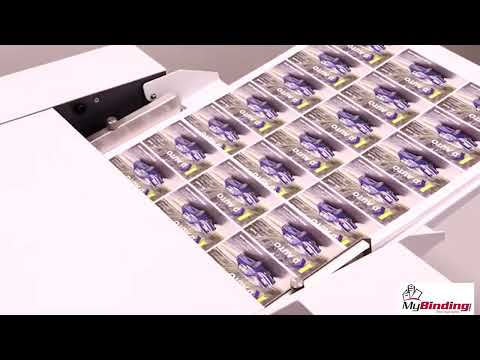
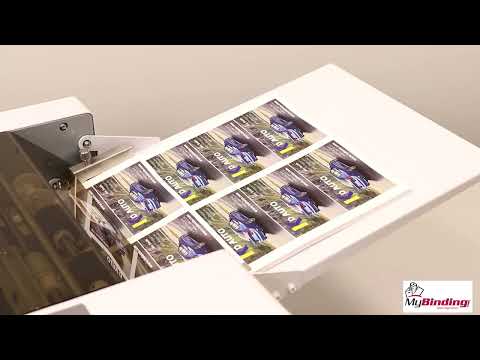
High-Speed Production: Achieve rapid output with the ability to cut up to 230 business cards per minute, perfect for high-demand environments.
Exceptional Precision: Enjoy flawless cuts with a cutting tolerance of just 0.1mm, ensuring professional-quality results every time.
Versatile Compatibility: Easily handle a variety of paper sizes and weights, accommodating both coated and uncoated stocks from 180 to 350gsm.
User-Friendly Operation: Simplify your workflow with an intuitive LCD control panel that allows for easy job setup and customization.
Product Description
The Formax FlashCard XL Business Card Cutter is a large-format, high-speed solution for on-demand production of full-bleed business cards, postcards, photos, and more, cutting up to 230 cards per minute. It features a user-friendly LCD display with 6 pre-set jobs and storage for up to 10 custom programs, processing 12" x 18" and 13" x 19" sheets with an infeed capacity of up to forty 200gsm sheets, and support for media up to 350gsm. Its automatic friction-feed system handles coated, uncoated, laminated, and card stocks, while self-sharpening blades deliver precise cuts with 0.1mm accuracy assisted by a registration mark reader. The FlashCard XL includes a 3.5" cutting cassette for 24-up 2" x 3.5" business cards, with optional interchangeable cassettes available for sizes such as 5" x 7", 3.5" x 5", 4" x 5", 8.5" x 11", 11" x 17", gift tags, menus, and mailers. Designed for efficiency and durability, it also offers an optional cabinet with waste bin and casters for increased production and mobility, making it ideal for print shops, schools, and businesses needing fast, precise short-run card cutting
Product Details
User-Friendly LCD Control Panel: Easily set up jobs, use programmed settings, or create custom cuts.
Heavy Duty Quick-Change Cutting Cassettes: Standard 3.5” cassette cuts 24-up business cards, optional cassettes available.
Double Friction Feed: Accurate feeding throughout job runs.
Programmed/Custom Jobs: 6 pre-programmed jobs, up to 10 custom job settings.
Incredibly Accurate: Cutting tolerance of 0.1mm.
Registration Mark Sensor: Reads printed mark on sheets to enhance accuracy.
Handles a Variety of Paper Stocks: Easily processes coated, uncoated and laminated sheets .
Paper Sizes: 12" x 18" and 13" x 19" sheets.
Paper Weights: Accommodates paper up to 350gsm / 130# cover.
Interlocking Cover: Blade will stop if cover is opened.
Optional FC-XL50 Cabinet: All metal cabinet on casters, with heavy duty waste bin for paper scraps.
Specifications
Speed: Up to 230 business cards per minute (12” x 18” sheet)
Cutting Tolerance: 0.1mm
Paper Sizes: 12” x 18”, 13” x 19”
Paper Weight: 180 - 350gsm
Paper Stock: Coated, non-coated, laminated
Programmable Jobs: Up to 16: 6 pre-programmed, 10 custom
Feed Tray Capacity: Up to 40 sheets 200gsm
Minimum Cut Length: 40mm
Feeding Style: Automatic friction
Registration Mark Reader: Yes
Dimensions: 31.5” W x 21.5” D x 11.5” H w/ Optional cabinet 31.5” W x 21.5” D x 40.5”H
Weight: 45 lbs. (21kg)
Power: 110V, 50/60Hz, .6 Amp
Certifications: CE
Spiral / Binding101 Part Number: 04FXFLASHXL
Video
Formax Flash Card XL Business Card Cutter Demo Video
Transcript :
Formax presents the Flash Card XL Large Format Business Card Cutter. Building on Formax's American engineering, R&D, and 35-plus years of experience utilized for the Flash Card, the large format Flash Card XL has been developed for greater on-demand production. Up to 13-inch by 19-inch sheets can be run through the Flash Card XL, increasing the speed, throughput, and cost efficiency for creating high-quality full-bleed business cards, postcards, photo cards, appointment reminder cards, laminate ID cards, greeting cards, and more.
The Flash Card XL delivers fast, accurate cuts every time at speeds of up to 230 business cards per minute. The heavy-duty cutting cassettes and friction feed system give the Flash Card XL the power to cut through paperweights of up to 350 GSM paper and up to 19 inches long without hesitation. Three heavy-duty Quick Change cutting cassettes are available with self-sharpening blades for enhanced output and minimal maintenance. The standard 3.5-inch business card cassette is included, with optional 5-inch and 11-inch wide cassettes for larger card sizes.
Users can choose from up to 16 jobs stored in memory: six pre-programmed for common applications and 10 programmable jobs for custom card sizes. Horizontal and vertical gutter settings create full-bleed graphics for a professional finish. A built-in registration mark sensor adjusts for slight print offsets, enhancing cutting accuracy and output quality.
The automatic friction feed system includes adjustable paper guides and holds up to 40 sheets of 200 GSM paper. The Flash Card XL includes two outfeed tray systems that can be easily adjusted to accommodate various size finished pieces, from business cards to 11?x 17? menus. An integrated waste bin neatly catches waste scraps for easy disposal. For more capacity, an optional cabinet with a larger built-in waste bin is ideal for users with increased volume and features casters for easy movement and storage.
The control panel is designed for easy operation. Simply select the programmed or custom job, enter the number of pieces needed, and press start. In seconds, printed sheets are precisely cut and collected in the catch tray.
The Formax Flash Card XL is a high-quality large format cutter engineered for precision, quality, and ease of operation that brings on-demand card cutting to the next level at an amazing industry-leading price and value.
Formax Flash Card Set Up and Operation Demo Video
Transcript :
Formax Flash Card Setup and Operation. When setting up your new Formax Flash Card Business Card Cutter, check to be sure you have all the parts: the operator's manual, power cord, waste bin, catch tray, and the Flash Card cutter. The Flash Card comes with a removable 3.5-inch business card cutting cassette already installed. Optional 7-inch and 8-inch cassettes are available separately for producing larger card sizes. Setting up the Flash Card is quick and easy. Begin by placing the Flash Card on a sturdy, level surface. Unfold the infeed tray from the top of the machine into place. Ensure the see-through top cover is aligned and in place. Slide the waste bin in until it is securely in place. Next, install the multi-directional catch tray on the outfeed side as shown here. The catch tray can be configured several ways based on the size of the cards being cut. In this position, it can accommodate cards up to two by four inches. Finally, plug in the power cord and switch on the power. With the Flash Card set up and ready for operation, it's time to set the infeed paper guides. Loosen the thumb screws that hold the guides in place and insert a sheet of paper between them. Slide the guides in until there is about a millimeter between the edge of the paper and the side guides, then tighten the thumb screws to hold the guides in place. The paper should slide freely between the guides. To load a stack of printed sheets, press down on the feed tray and slide the forms under the feed tires. Release the tray when in position. Next, choose one of the pre-programmed jobs on the screen or create and choose a custom job. With a job selected, input the number of pieces needed. If a 10-up business card sheet is being cut, 10 pieces equal one sheet. Increase the number of pieces based on the number of sheets (50 pieces equal five sheets, and so on). The auto setting can be selected to run all the sheets placed in the infeed tray. To begin, press the start button. When cutting a job with a printed alignment mark, be sure the mark option is selected. If running without a mark, the edge option should be selected. To change the cutting cassette, remove the top cover and remove the thumb screw shown here, which keeps the cassette in place. With the screw removed, lift the cassette up and out off the machine's alignment pins. Install the new cassette, making sure it rests on the alignment pins and that the gears are aligned. Then, replace the thumb screw to hold it in place. Finally, replace the top cover. To change the catch tray to match your chosen cut, simply lift off the catch tray and switch the hanging position to accommodate the largest available cuts. Remove the center divider as shown. Please refer to the operator manual for further details.