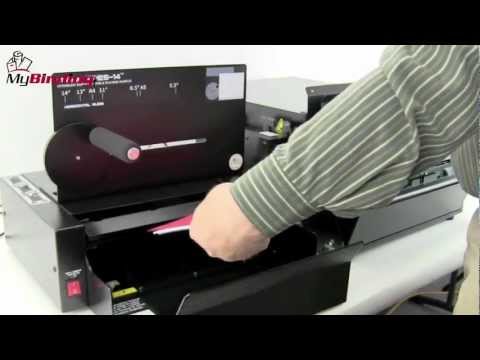
Rhin-O-Tuff Onyx APES-14 Automatic Paper Ejector and Stacker
FAQ: 0 Questions, 0 Answers
0 Q&As
Item# APES14-ONYX
- APES-14 attaches to the HD7700, HD7000 or HD6500 HD Punches
- Ejects and stacks in one smooth operation
- Works with documents from 5.5" x 5.5" to 8.5" x 14"
- 6 Year Manufacturer Warranty
Product Name
Item Number
Price
Qty
ProductDescription
Upgrade your work productivity and Rhin-O-Tuff HD Punch with the Onyx APES-14. The Automatic Paper Ejector and Stacker (APES) module create a one smooth motion of punch, eject and stack operation. The APES-14 easily attaches to your HD7700, HD7000 or HD6500 and handles paper sizes from 5.5" X 5.5" up to 14" X 14" (140 X 140mm to 356 X 356mm). The automatic paper ejector and stacker are also capable to handle cover stock and tabs with no problem. The Onyx APES-14 can increase productivity up to 50% and also extend the functionality life span of your existing HD7700, HD7000 or HD6500. Rhin-O-Tuff designed the machine for fast and accurate results with superior simplicity of installation and setup. For premium, heavy-duty and durable punch and bind operations look no further than Rhin-O-Tuff Onyx Series.
Product Details
- APES-14 attaches to the HD7700, HD7000 or HD6500 HD Punches
- Ejects & Stacks in One Operation.
- Extends the Useful Life of your Existing Equipment.
- Increases Punching Output without a Large Capital Outlay.
- Increases Productivity up to 50% without the Hiring of Additional Help.
- Handles paper sizes from 5 1/2 x 5 1/2 inches up to 14 x 14 inches (140 X 140 mm to 356 X 356 mm).
- Handles Cover Stock and Tabs with Ease.
- Can be used in Standard Mode for those Odd Jobs while still attached.
- Easily installed on Existing Equipment.
- Fast and Accurate with Rhin-O-Tuff Reliability.
- Comes with a 6 Year Warranty.
Item Specifications
- Model: APES-14 ONYX"
- Weight: 58 lbs. (26.3 Kg)
- Electrical Requirements:
- Volts AC: 115/230
- AMPS: 1.5/0.75
- Hz: 60/50
- Actual Machine Dimensions: 15X38X22
- Actual Machine Weight : 55
- Shipping Length : 25
- Shipping Width: 25
- Shipping Height: 21
- Shipping (Web) Weight: 64 lbs
- Warranty: 6 Year Manufacturer Warranty
Demonstration Video
Rhin-O-Tuff Onyx APES-14 Automatic Paper Ejector And Stacker Demo Video
Transcript :
Welcome to MyBinding video. Let's have a look at Rhin-O-Tuff's Onyx APES 14, an automatic paper ejector and stacker module. For businesses and organizations that have a lot of punching and binding to do, the Onyx APES 14 could be a great investment. Essentially, it's an all-in-one unit where you drop your paper in, press the button. It punches, ejects your paper, and stacks it all together. So regardless of the size of your project, it's ready to go to the binding phase next. The Onyx APES 14 modules was designed to make your punching extremely efficient. That is Rhin-O-Tuff's Onyx APES 14, au ...
Welcome to MyBinding video. Let's have a look at Rhin-O-Tuff's Onyx APES 14, an automatic paper ejector and stacker module. For businesses and organizations that have a lot of punching and binding to do, the Onyx APES 14 could be a great investment. Essentially, it's an all-in-one unit where you drop your paper in, press the button. It punches, ejects your paper, and stacks it all together. So regardless of the size of your project, it's ready to go to the binding phase next. The Onyx APES 14 modules was designed to make your punching extremely efficient. That is Rhin-O-Tuff's Onyx APES 14, automatic paper ejector and stacker module. For more demos, reviews, and how-tos and all things Onyx or anything dealing with your paper binding systems, check out MyBinding.com.
Rhin-O-Tuff APES 14 + PAL-14 on HD7700 Demo
Transcript :
Welcome to MyBinding video. This video looks at the Rhin-O-Tuff Onyx total punch system, the HD7700 punch, the PAL-14 picker, and the APES 14 ejector and stacker module, all working in tandem. The basic configuration here is the Onyx HD7700 punch. Adding to that we put the Onyx PAL-14-77. This is a Piks-A-Lift module that picks packets up perfectly for your punch size. And finally, the APES 14, which ejects papers that have been punched and stacks them up. And here's the whole system at work together. We've created a step-by-step instructional video to help you assemble the APES 14 and the PAL ...
Welcome to MyBinding video. This video looks at the Rhin-O-Tuff Onyx total punch system, the HD7700 punch, the PAL-14 picker, and the APES 14 ejector and stacker module, all working in tandem. The basic configuration here is the Onyx HD7700 punch. Adding to that we put the Onyx PAL-14-77. This is a Piks-A-Lift module that picks packets up perfectly for your punch size. And finally, the APES 14, which ejects papers that have been punched and stacks them up. And here's the whole system at work together. We've created a step-by-step instructional video to help you assemble the APES 14 and the PAL-14 to your HD7700. You can watch it in real time and it will take you through the entire process until you're perfectly set up and then you can run your first project. You'll be impressed at just how efficient and simple the whole process becomes with all of these together. Here's a few more looks at this great system: the Onyx HD7700, the Onyx APES 14, and the Onyx PAL-14. And all of this backed by the Rhin-O-Tuff six-year warranty. For more demos, reviews, and how-tos, check out MyBinding.com.
How to Set Up and Run Rhin-O-Tuff's Punch and Bind Auto Ejector and Stacker Module
Transcript :
This is a Rhin-O- Tuff. Let's have a look at Rhin-O- Tuff Onyx APES 14 an automatic paper ejector and stacker module. In this video, we will put it all together and see it in action. The Onyx APES comes with its own assembly box pull out all the parts and lay them down flat. With tools and parts ready to go use the allen wrench on the left and right hand side to remove the bolts so you can put your frame on. Be sure only to remove the front two bolts on the top row. When all four bolts are removed, use provided bolts to take the carriage with the frame and put it on each side. Bolts go right i ...
This is a Rhin-O- Tuff. Let's have a look at Rhin-O- Tuff Onyx APES 14 an automatic paper ejector and stacker module. In this video, we will put it all together and see it in action. The Onyx APES comes with its own assembly box pull out all the parts and lay them down flat. With tools and parts ready to go use the allen wrench on the left and right hand side to remove the bolts so you can put your frame on. Be sure only to remove the front two bolts on the top row. When all four bolts are removed, use provided bolts to take the carriage with the frame and put it on each side. Bolts go right in here, two on each side. Fasten them all the way in, good and tight, nice and neat. It will be these two frames on which the ejector portion of the Onyx APES 14 will be fastened. When these are in place, make sure the top of the machine is completely clear, because we will set the paper ejector part of the Onyx APES 14, right there. But before we do that, we first have to remove the paper stop. Simply unscrew it and pull it right off, store it someplace safe. And if you have a Palm switch installed on your Onyx HD 7700 remove it as well.
And now gently place the paper ejector portion on the machine right here on the top of the punch, ensure that it's good flush and the holes line up. Then use the plastic handled screws to screw in both sides, one on each side, when those are down good and tight. If you'd like to, you can replace the Palm switch right here on the right hand side of the machine with a smaller on wrench, loosen up the front screw just enough to pull it out and slide the platform in, tighten the bolt all the way down so to hold the platform in place and on this attach your pump switch, setting it to your user preference. We've now finished installing the ejector.
Now for the paper stacker portion, note that you'll plug into the ejector right here with this cord, but let's wait till after we've assembled the whole thing. Set the stacker portion to the left of the machine, lining up the grooves on this platform. Then these two handles slide right down inside. They just push right in. They don't screw it now, connect the ejector to the stacker. Stacker to the punch and the Palm switch to the ejector, and you're all set at this point, your Onyx setup should look like this, all lined up and ready to go.
Let's begin with the finishing touches on the stacker side of the module. The last two plastic panel screws go right here on the top, then the reception paper guide lines right up on that with these two screws and tighten them down. When that's down, couldn't tie it in place. The reception paper stop is then fastened to the guide.
And now moving over to the paper ejector side, the front and rear paper deflectors are to be installed. The front paper deflector goes right here underneath these two brass knobs tighten those down, and the rear paper deflector goes back here underneath these two brass knobs, and again, tighten those down. The two deflectors should be parallel and in there good and tight. There it is. Assembly is finished.
Now let's watch the whole system at work. On the left side of the stacker are three switches where you can disengage different parts the stacker side, whether or not you're using the paper stop with a foot pedal or portrait and landscape orientation. With these selections made, let's run a test paper first. Let's set it up. Let's punch a book using standard eigth and half by eleven paper using the screw in the back. Set the reception paper stop to the size paper you're using here, 11 inch you set it to paper inside, make sure the foam covered bar is about halfway up the paper. Next, we'll make adjustments to the stacker tray. These little knobs here pull right up so you can adjust the tray on the bottom. Pull it out to the size that you need. Place your paper down inside the top of the paper should go right along this edge of flying a adjust the drawer accordingly with that said, lock down the plastic knobs.
With this book, we'll be using a three to one pitch coil punch die, keeping an eye on the paper guides in the front you want to align the size of paper with this type of die that you're using. The style knob on the right side allows you to fine tune to get those lines exactly perfect. Drop your paper now in between the two paper guides into the throat of the machine, slide it to the right until it stops, and adjust this file. Stop and we're ready.
And everything works together to create your punch to book. Just watch the speed efficiency of this punch ejector and stacker system that is Rhin-O- Tuff Onyx APES 14 automatic paper ejector and stacker module. This is just one more part of the Rhin-O- Tuff Onyx series