-
Model NameModelSpeedHopper CapacityPre-Set FoldsPre-MarkedPaper SizesPaper SizeDimensionsWeightPowerOptionSafety CertificationsWarranty
-
FD-346
Up to 15,500 sheets per hour – based on 11" (279mm) Z-Fold, 6 SettingsUp to 500 sheets 20# (75gsm)C, V, Z, Gate, Fold Out and Double ParallelFD Model: 11", 14", 17"FE Model: A5, A4, A3, B6, B5, B4Min: 3.5" W x 5" L (88.9 W x 127 L mm), Max: 12.25" W x 18" L (311 W x 457 L mm)Closed: 33" L x 20" W x 19" H (84 L x 51 W x 48 H cm), Fully Extended: 60" L x 20" W x 19" H (152 L x 51 W x 48 H cm)67 lbs (30kg)FD Model: 110VAC 50/60 HzFD 300-20 - Multi-Sheet FeederUL, CUL, and CE approved90 Days Warranty Parts -
FD 386
Up to 17,000 sheets per hour – based on 11" (279mm) Z-FoldUp to 500 sheets 20# (75 gsm)Pre-programmed for C,V,Z, Gate, Fold Out and Double ParallelN/A11", 14", 17", A5, A4, A3, B6, B5, B4Min: 3.5" W x 5" L (88.9 W x 127 L mm), Max: 12.25" W x 18" L (311 W x 457 L mm)Closed: 33" L x 20" W x 19" H (84 L x 51 W x 48 H cm), Fully Extended: 60" L x 20" W x 19" H (152 L x 51 W x 48 H cm)73 lbs (33kg)110-240VAC 50/60 HzFD 300-20 - Multi-Sheet FeederUL & CE applied for90 Days Warranty Parts -
FD 38Xi
Up to 17,000 sheets per hour – based on 11" (279mm) Z-FoldUp to 500 sheets 20# (75 gsm)Pre-programmed for C,V,Z, Gate, Fold Out and Double ParallelN/A11", 14", 17", A5, A4, A3, B6, B5, B4Min: 3.5" W x 5" L (88.9 W x 127 L mm), Max: 12.25" W x 18" L (311 W x 457 L mm)Closed: 33" L x 20" W x 19" H (84 L x 51 W x 48 H cm), Fully Extended: 60" L x 20" W x 19" H (152 L x 51 W x 48 H cm)73 lbs (33kg)110-240VAC 50/60 HzN/AUL & CE applied for90-Day Warranty on Parts
Formax FD 386 Automatic Paper Folder
- Speed: Up to 17,000 sheets per hour – based on 11" (279mm) Z-Fold
- Hopper Capacity: Up to 500 sheets 20# (75 gsm)
- Pre-Set Folds: Pre-programmed for C,V,Z, Gate, Fold Out and Double Parallel
- Custom Folds: Up to 27
ProductDescription
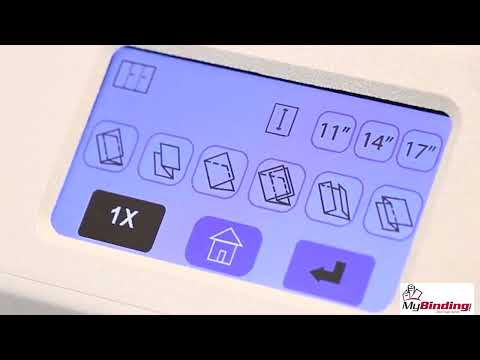
Folds up to 500 sheets in as fast as 2 minutes with just a few touches, the Formax FD 386 Automatic Touchscreen Paper Folder gets the job done exceptionally fast. Fully automated with 18 pre-programmed fold settings plus 27 custom folds of your choice that can be stored into memory that can be easily operated with one touch set-up.Operation requires little to no instruction as FD 386’s full-color touchscreen control panel is extremely easy to use with its universal symbols and step-by-step user interface. Simply load up to 500 sheets in the hopper, select fold of choice, press start and walk away to attend to other important tasks. The FD 386 is equipped with patented Telescoping Conveyor System that holds the folded pieces and an optional patented Multi-Sheet Feeder that allows up to 4 stapled or unstapled sheets to be folded at one time through the dedicated feed system with its own side guides and skew adjustment. The FD 386 advanced software allows for all standard fold types and paper sizes to be customized to meet your particular needs. The FD 386 can also be combined with the optional Formax V-Stack36i Vertical Stacker, which stacks up to 22” of folded documents, making them easier to unload for further processing.If you are looking for a fast and high quality paper folding machine, look no further than the Formax FD 386 Automatic Touchscreen Document Folder.
Product Details
- Operating Features:
- Fast!: Large jobs are processed quickly at speeds of up to 17,000 pieces per hour
- Color Touchscreen: The large full-color touchscreen control panel allows anyone to walk up and start folding in seconds
- Drop-In Feed System: Three-roller drop-in feed system produces dependable feeding of forms with no fanning required
- Adjustable Stacker Wheels: Stacker wheels can be manually adjusted to neatly and sequentially stack different paper sizes and fold types
- Telescoping Conveyor System: Conveyor can be set between 14" (356mm) and 36" (915mm) in length and holds up to 500 folded pieces
- Noise Reduction: Fold plates are enclosed and insulated to reduce operating noise
- 6-Digit Resettable & 8-Digit Life Counters: Provides maximum audit control
- AutoBatchTM: Programmable to process pre-set number of sheets into sets with a delay
- Folding Features:
- Six Standard Folds in Common Paper Sizes: Pre-programmed for 6 popular fold types in letter, legal and ledger paper sizes equalling 18 preset fold settings
- Custom Folds: Up to 27 custom folds can be programmed and stored into memory
- Standard Fold Settings Modification: Even the six standard fold types can be modified individually for each paper size for maximum flexibility and customization
- Cross-Folding: A guide is included for two pass operation
- Technical Features:
- Easy-Off Feed Wheel Shaft: Feed wheels can be changed without removing side covers
- Seven Point Fold Stops: Fold plates utilize seven point fold stops for crisp, accurate folds of large paper sizes at high speeds
- Removable Roller Cover: Easily removed for improved access to fold rollers and exit area
- Options:
- Dedicated Multi-Sheet Feeder: Allows for up to 4 stapled or unstapled sheets to be folded at once, with the ability to select standard or custom folds in letter and legal paper sizes
- Locking Cabinet: Fully enclosed for storage
- V-Stack36i Vertical Stacker: Aligns with FD 386 outfeed and vertically stacks up to 22" of folded documents, making them easier to unload for further processing
Item Specifications
- Speed: Up to 17,000 sheets per hour - based on 11" (279mm) Z-Fold
- Hopper Capacity: Up to 500 sheets 20# (75 gsm)
- Pre-Set Folds: Pre-programmed for C,V,Z, Gate, Fold Out and Double Parallel
- Pre-Set Paper Sizes: 11", 14", 17", A5, A4, A3, B6, B5, B4
- Custom Folds: Up to 27
- Paper Size:
- Min: 3.5" W x 5" L (88.9 W x 127 L mm)
- Max: 12.25" W x 18" L (311 W x 457 L mm)
- Dimensions:
- Closed: 33" L x 20" W x 19" H (84 L x 51 W x 48 H cm)
- Fully Extended: 60" L x 20" W x 19" H (152 L x 51 W x 48 H cm)
- Weight: 73 lbs (33kg)
- Power: 110-240VAC 50/60 Hz
- Option: FD 300-20 - Multi-Sheet Feeder
- Safety Certifications: UL & CE applied for
- Manufacturer's Warranty: 90 Days Manufacturer's Warranty Parts
Demonstration Video
Formax FD 386 Document Folder Demo Video
Formax FD 386 /38xi Set Up and Operation Document Folder Demo Video
Installation:
Remove the FD 386 or 38XI and accessories from the box and place on a level sturdy surface. Included with the machine are the upper and lower-fold tables, telescoping outfeed extension, multi sheet feeder, if equipped, cross fold guide, power cord and the operator manual. Check to be sure everything is included. To begin installation, lift up the feed tray extension and lock into position. Next, insert the cross-fold guide into its storage location under the lower fold table. Then, install the te ...
The Formax FD 386 and 38XI touchscreen automatic paper folder setup and operation.
Installation:
Remove the FD 386 or 38XI and accessories from the box and place on a level sturdy surface. Included with the machine are the upper and lower-fold tables, telescoping outfeed extension, multi sheet feeder, if equipped, cross fold guide, power cord and the operator manual. Check to be sure everything is included. To begin installation, lift up the feed tray extension and lock into position. Next, insert the cross-fold guide into its storage location under the lower fold table. Then, install the telescoping outfeed extension on the outfeed conveyor stacker as shown. Now, install the upper fold table. The fold table rests on the support pins shown here. Slide the cutouts on the fold table onto the pins and set into position. With the upper fold table installed, you can now plug it in and lock it into place, if equipped. Install the lower fold table in the same way as the upper fold table, be sure the fold table is seated properly on the support pins. Plug it in and lock it into place, if equipped. Next, install the multi sheet feeder, if equipped. Insert the front stationary tabs of the feeder into the cutouts on the top cover. Squeeze the tabs on the rear of the feeder to lower and lock into place. With both fold tables installed and properly plugged into the machine, plug the main power cord into the receptacle below the conveyor stacker, then plug the cord into the appropriate outlet. With the machine plugged in, the folder is installed and ready for setup and operation.
Setup and operation:
Turn on the power using the switch located under the lower fold table on the infeed side. If equipped, adjust the infeed tray tension lever to match the weight of the paper. The middle position is for standard paper weights. Next, adjust the infeed side guides, loosen the self-centering side guides and place a sheet between them. Slide the guides in leaving about a millimeter gap between the paper and the guide on both sides so it can slide freely and tighten the guides in place. To load paper, pull up on the lever as shown, to lower the infeed table, then insert the stack of paper under the feed tires and release the lever. The sheet size will automatically be detected. Now, using the touch screen control panel, choose from one of the pre-programmed folds. Once selected, the fold tables and outfeed stacker wheels will automatically adjust for the FD 38XI, for the FD 386, the outfeed stacker wheels will need to be manually adjusted based on the paper size chart located on the stacker wheel brace. With the fold position set, press the one-time button to make a test fold and check the quality. If the fold looks good, adjust the speed and press the start button to begin folding. If the fold is off, adjust the skew knob left or right to correct the fold.
Multi sheet feeder:
To set and use the multi sheet feeder if equipped, begin by selecting the fold type. Next, adjust the paper width guide on the feeder. Be sure the paper slides freely into the feeder. The feeder has an independent skew adjuster to fine tune the multi sheet folds. Be sure the papers are aligned and that the staple is on the correct side if folding stapled sets and slide them into the feeder. The folder will automatically detect the sheets and start the folder.
Cross folding guide:
The Cross-fold guide allows for a second pass of a pre folded document to add an additional fold to use the cross-fold guide, remove it from the storage location under the lower fold table. Insert pre folded sheets into the feed tray and mount the cross-fold guide into the mounting slots on the rear side guide, as shown here. Select the fold type and press start.
Resetting the counter:
The six-digit counter keeps an accurate count of sheets folded. To reset the counter, simply press the reset button next to the counter to bring it back to zero.
Auto batch mode:
Auto batch mode is ideal for processing mail in batches, for easier handling. To access this mode, press the blue auto batch icon on the home screen. Then, select the number of sets, the number of sheets in each set and the delay between each set. With the settings entered, press start to begin processing.
Custom folds:
For jobs requiring a specialized fold, the FD 386 and 38XI allow users to customize folds to their exact specifications. Press the custom fold icon and select the measurements for the upper fold table, the lower fold table, and the outfeed stacker location. You can perform a test fold, and if it looks good, save and name your new custom fold.
Troubleshooting misfolds:
If a misfold occurs, first, check that the fold tables are properly seated. The cutouts on each fold table should line up with the support pins and be firmly seated in place. Next, check the fold settings. Be sure the fold specifications are correct for the fold type and paper size. And finally, if the fold is a little off, or if you require different settings for the machine, use the advanced software to customize and save custom folds.
Troubleshooting misfeeding:
If the sheets are misfeeding, first check that the in-feed side guides are set properly. There should be about a one-millimeter gap between the guides and the paper on each side. If the guides are too tight or too loose, the paper will not feed properly. Second, check that the paper stack is properly squared when loading. And finally, check and adjust the infeed tension lever, if equipped. For additional troubleshooting, please refer to the manual, the FD 386, 38XI touchscreen automatic paper folder.