Rhin-O-Tuff HD7000 Onyx 14" Open-Ended Table Top Electric Punch
- Electric punch for up to 40 sheets* at a time
- 20+ interchangeable dies available including comb, coil, and wire binding patterns
- Heavy-duty, perfect for print shops & large offices with high volumes
- 14" punching length with open throat & fully disengageable pins
ProductDescription
Product Details
- Automatic and Manual Reverse feature to reduce jamming in the punch
- Punches up to 40 sheets or 80 pages of 20 lb paper (Number of Sheets varies on the paper weight and punch pattern used)
- Rate of 25 cycles per minute
- Auto and manual reverse clears most punching jams
- Quick Change Die System with easy disengageable pins
- 20 interchangeable dies available with 12 standard hole patterns (Each die is priced and sold separately)
- Accu-Set adjustments on odd size paper
- Efficient work environment with a standard foot pedal and optional versa switch
- Extreme high capacity Waste Chip Tray with Clear View Access
- Heavyweight metal construction
- Made in the USA with more than 98% recyclable materials
Item Specifications
- Model: HD7000 ONYX
- Available Die Sets: More than 20 Interchangeable Dies with 12 Standard Hole Patterns
- Punch Capacity Up to 40 Sheets or 80 Pages of 20 lb paper
- Punch Length: 14" Punching Length with 14" Open Ended Extra Capacity Die
- Fully Disengageable Pins:Yes
- Weight: 100 lbs
- Actual Machine Dimensions: 8" x 17" x 17"
- Actual Machine Weight : 87
- Shipping Length : 27
- Shipping Width: 25
- Shipping Height: 4
- Shipping (Web) Weight: 100 lbs
- Manufacturer's Warranty: 6 Year Manufacturer's Warranty
- Compatible Accessories: HD7000 Punching Dies
Mounting Kit (for use with HD modular finishers)
Versa Switch
Palm Switch - Compatible Equipment: APES-14 Automatic Paper Ejector and Stacker
PAL-14 Piks-A-Lift Electric Paper Separator
PAL-M Piks-A-Lift Manual Paper Lifter - Compatible Supplies: Spiral Coils
Twin Loop Wire
Plastic Combs
Velo Binding Strips
Ring Binders
Demonstration Video
Rhin-O-Tuff Onyx HD7000 Unboxing and Assembly Demo Video
Easy Punch Die Change For Rhin-O-Tuff Onyx HD7000 Overview
Welcome to MyBinding how to videos. This is easy die change for the Rhin-O-Tuff Onyx HD7000 punch. Multiple projects require multiple dies; no problem on the HD7000. Rhin-O-Tuff's interchangeable die system makes that so easy. Just release the lever on each side of the machine. The die is retrieved from the right-hand side. Simply slide it all the way out and switch it out. Rhin-O-Tuff has made a number of different dies for different configurations and they all slide right back in the same way. Make sure the black part is flush with the side of the machine and lock it up. And that's all there is to it. That's easy die change for the Rhin-O-Tuff Onyx HD7000. For more demos, reviews, and how tos, check out MyBinding.com.
Welcome to MyBinding video. This is the all-new Onyx HD7000 by Rhin-O-Tuff. Using a 4:1 coil punch die, let's watch the HD7000 in action. With your project assembled and in order, let's do some test sheets. Drop the papers in the throat, slide to the left, and press the button. Pull the papers out and see how it worked. At this point, you can adjust the side margin control knob, or the paper stop, set it in place so that your entire project is consistently punched throughout. A very effective way of checking is to fold the paper over, line up the corners, and see are the holes lined up as well. Should you have any half holes or need to remove any punch pins, simply slide out the die, depress the pin carriage, pull out the pin capture, remove any pins and all pins that you need, replace the pin capture, and reload the die.
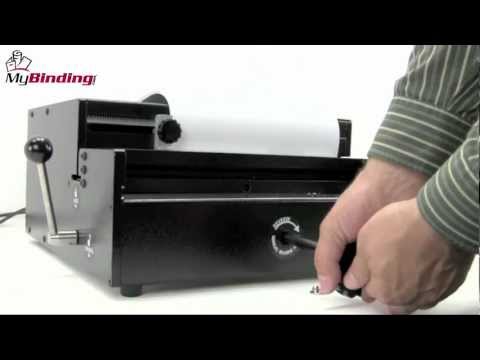
For punching on the HD7000, you can use the included foot pedal or add the Versa switch or Palm switch. With the paper stop and switches in place, we're ready to punch the project. Split your book into smaller batches. The HD7000 can punch up to 40 sheets of 20lb paper per punch. And systematically punch through all your project until you are finished. Gather everything together, it will be time to bind. In the unlikely event of a paper jam, the Onyx HD7000 has a reverse feature. The first thing to do is to power down the machine with the switch in the back, and then remove the chip tray by lifting it up and out. Take the reverse knob that came with the machine and remove the small cover over the access hole. The knob goes inside the hole, snaps into place, and turning in a clockwise direction will reverse the pins. To guide yourself, you can look just to the left of the paper stop, down inside, and you can see the pins retracting as you turn the wheel. When they're fully retracted, you can remove your paper. And with your book successfully punched, bind away. There it is, you're on your way to binding a great many books with the Onyx HD7000.
For more demos, reviews, and how-tos, check out MyBinding.com.